Love Bugs Huggy Bears Coloring Pages: Building a KDP Interior That Sells
Creating a successful Kindle Direct Publishing (KDP) low-content book requires more than just a cute theme. You need a complete, print-ready interior that meets Amazon’s technical specifications and appeals to your target audience. Love Bugs Huggy Bears Coloring Pages offer a ready-made asset pack designed specifically for this purpose. This article walks through how you can use these files to build a unique coloring book interior, from initial planning to final upload.
What the Love Bugs Huggy Bears Coloring Pages Pack Includes
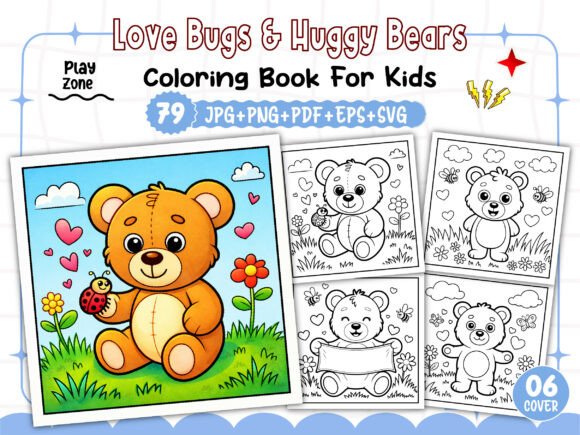
This interior download is structured to give you everything you need to produce a professional coloring book without starting from scratch. The pack provides 79 unique black-and-white coloring page designs featuring the Love Bugs Huggy Bears characters, plus additional assets for your book cover. All image files come at 300 DPI resolution, which is the standard required by Amazon for crisp, clean printing. The dimensions are set at 8.5 x 8.5 inches, a popular square format for children’s activity books and adult relaxation coloring books alike.
The file formats included are:
- 06 PNG images for your book cover (front, back, and spine options)
- 01 PDF file, print-ready and fully tested on KDP
- 01 EPS file for editable vector work
- 79 JPG images at 300 DPI
- 79 PNG images at 300 DPI with transparent backgrounds
- 79 SVG images at 300 DPI for scalable vector editing
All images are black and white, which is essential for coloring pages. The variety of formats gives you flexibility depending on your workflow and design software preferences.
Where This Fits in Your Publishing Workflow
When you are producing a coloring book for KDP, the interior is the core deliverable. The Love Bugs Huggy Bears Coloring Pages function as the raw material that you assemble into a formatted book. This approach suits several stages of a broader content creation process:
Before You Begin Designing
If you are still in the planning phase, this pack lets you evaluate whether the theme and illustration style align with your niche. The characters are cute, approachable, and suitable for both children and adults who enjoy gentle, whimsical designs. Reviewing the 79 designs gives you a clear picture of the variety you can offer without commissioning custom art.
During the Assembly Process
Once you have decided on the theme, the actual assembly work involves importing the images into a layout program (like Adobe InDesign, Canva, or Affinity Publisher), arranging them with or without borders, adding page numbers if desired, and exporting a single PDF. Because the files come in multiple formats, you can choose the one that best fits your software. For instance, SVG and EPS files are ideal if you need to resize or tweak individual elements without losing quality. PNG and JPG files work well for direct placement.
After Publication – Repurposing
These same designs can be used across multiple products. You might create a standard coloring book, a smaller travel-sized edition, or even a digital download for print-on-demand. Because you own the license to use the files in your KDP products, you can adapt the same art for different formats or bundle them with other themed pages.
Practical Implementation Tips for KDP Creators
Using these Love Bugs Huggy Bears Coloring Pages effectively involves more than just dropping images into a document. Here are workflow considerations that improve quality, consistency, and long-term usability.
Check Compatibility with Your Software
Before you start assembling, confirm that your chosen design tool can import the file formats you plan to use. The EPS and SVG formats are vector-based, meaning they scale infinitely without pixelation. If you are using Canva (free version), you may need to use PNG or JPG because EPS support is limited. InDesign and Affinity Publisher handle all formats well. If you work in vector software like Adobe Illustrator, the SVG and EPS files give you full control over stroke weight and fills.
Organize Your Files by Format and Sequence
The pack includes 79 images each in JPG, PNG, and SVG. Rather than mixing them, keep them in separate folders. Decide on a naming convention early—something like LoveBugs_01, LoveBugs_02, and so on. This makes it easy to find specific pages when you are editing or adding page numbers. Also, decide whether you want each design to appear on its own page or if you will place two smaller designs per page (common for lower page counts).
Maintain Consistent Resolution
All provided images are 300 DPI, which is the resolution Amazon requires for color and black-and-white interiors. When you import them into your layout, double-check that your software does not downscale them. If you resize an image in your layout, keep the dimensions proportional and avoid making them larger than the original, which could introduce blurriness. The 8.5 x 8.5 inch canvas means each image should fill most of the page or be centered with a consistent margin.
Use the Cover Assets Strategically
The pack includes six PNG images for the book cover. These are separate from the interior pages and are meant to help you create a cohesive front and back cover. You can combine them with your own title text, author name, and any additional graphics. Because they are high-resolution PNGs with transparent backgrounds, they layer easily over colored backgrounds or patterns. Test your cover mockup using KDP’s cover calculator to ensure the dimensions match.
Quality Control Before Upload
Even with a ready-made interior, quality assurance is your responsibility. Here are checks to run before you publish:
- Preview every page. Page through the entire PDF to confirm that no images are missing, cropped incorrectly, or placed off-center.
- Check for bleed requirements. Amazon’s standard for bleed is 0.125 inches on each side. If you want images to extend to the edge of the page, you need to set up your document with bleed. If you prefer a clean white margin around each image, set the image inside the safe zone (at least 0.25 inches from the trim edge).
- Test print a few pages. Use your home printer or a local print shop to see how the black lines appear on standard paper. This verifies that the 300 DPI resolution translates well to physical output.
- Validate the PDF. Amazon provides a free Kindle Kids Book Creator tool and a general PDF validation guide. Run your final PDF through these checks to catch any formatting errors early.
Long-Term Use and Scalability
One of the advantages of using the Love Bugs Huggy Bears Coloring Pages is that you are not limited to a single book. Because the files are yours to use in your KDP business (as noted, they are fully tested on Amazon’s platform), you can develop multiple products from the same core set of images. For example:
- Standard coloring book – 79 pages, one design per page
- Activity book bundle – combine these pages with mazes, word searches, or dot-to-dot puzzles (using other licensed assets)
- Digital download – offer a PDF of selected pages as a lead magnet or paid product
- Series expansion – if the theme performs well, look for additional packs with similar illustration styles to create Volume 2
Having the EPS and SVG files also means you can modify the artwork if you have vector editing skills. You might change line thickness, add borders, or incorporate small elements like stars or hearts around the main design. This customization helps differentiate your book from others using the same pack, while still leveraging the original artwork.
Usability Across Skill Levels
Not every KDP publisher has graphic design experience. The Love Bugs Huggy Bears Coloring Pages are structured to accommodate different levels of technical comfort. If you are new to book assembly, start with the PDF file. It is already print-ready, meaning you can upload it directly after adding your title page and copyright page. If you have some design background, use the JPG or PNG files in Canva or a similar drag-and-drop tool. If you are comfortable with vector software, the SVG and EPS formats give you the most flexibility. This layered approach means you are not locked into a single workflow.
Preparing for Amazon’s Requirements
Before you hit publish, confirm a few technical details. The 8.5 x 8.5 inch size is acceptable for both paperback and hardcover formats on KDP, but check the most current guidelines for trim size limits. Also, Amazon requires that coloring book interiors have at least 24 pages (the cover counts as a page in some cases). With 79 designs, you exceed that minimum comfortably, giving you room to add a title page, copyright page, and a “this book belongs to” page without falling short.
The 300 DPI resolution ensures your line art reproduces cleanly. Avoid compressing images or saving the PDF at a lower resolution, which can result in jagged lines when printed. Use Amazon’s preview tool to examine your book at full size before approving the proof.
Integration with Other Tools and Platforms
While the Love Bugs Huggy Bears Coloring Pages are designed for KDP interiors, the files can be repurposed for other print-on-demand platforms such as IngramSpark or Lulu, as long as you respect the licensing terms. The EPS and SVG files also integrate with cutting machines like Cricut or Silhouette if you later want to create physical products like stickers or cards. This cross-platform usefulness extends the value of a single purchase.
For marketing, you can use the cover PNGs to create social media mockups, listing images, or even a simple teaser video. Because the cover images are separate from the interior, you can adjust your cover design without touching the interior files.
Final Observations on Workflow Efficiency
Building a KDP interior from scratch requires sourcing art, ensuring consistency across pages, managing file formats, and testing print quality. The Love Bugs Huggy Bears Coloring Pages streamline that process by providing a complete set of ready-to-use assets. You still need to invest time in layout, formatting, and quality checks, but the heavy lifting of illustration is already done. For creators who want to move from concept to publication quickly while maintaining professional quality, this approach offers a practical, repeatable workflow. Whether you are publishing your first coloring book or adding to an existing series, the combination of file variety, high resolution, and print-ready formatting gives you a solid foundation to build on.