Getting the Most from Your Magical Houses Coloring Book
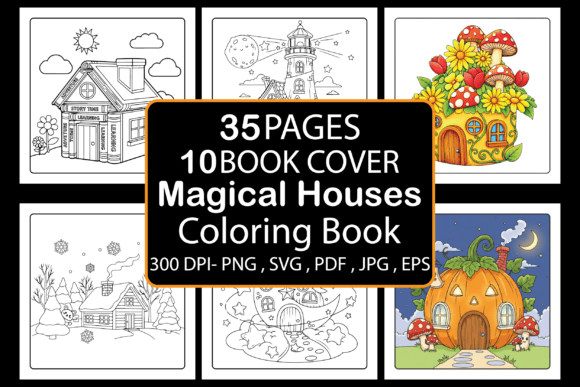
If you have come across the Magical Houses Coloring Book, you have likely noticed it is described as a digital printable with 35 pages of whimsical architecture, suitable for both adults and kids, and ready for use on platforms like Amazon KDP or print-on-demand services. On the surface, it sounds straightforward—download the PDF, upload it, and sell or color. But after working with dozens of similar products and speaking with creators who have struggled, I have found that several common mistakes and overlooked details can turn what should be a simple process into a frustrating experience. This article walks through those pitfalls and offers practical, solution-focused advice so you can avoid wasted time, poor print results, and missed opportunities.
The Magical Houses Coloring Book is exactly what the name suggests: a collection of 35 detailed illustrations of enchanting homes, from cottages with winding vines to towering spires with curious windows. It comes as an 8.5 x 8.5 inch PDF with bleed, plus additional formats like JPG, PNG, EPS, and SVG, along with ten book cover backgrounds. This flexibility makes it appealing for personal relaxation, professional resale, or creative projects. However, that same flexibility introduces a handful of decisions where people often go wrong.
Mistake One: Assuming the PDF Is All You Need
Many buyers download the main PDF and consider the job done. They upload it directly to KDP or send it to a print shop without checking whether the file actually meets the platform’s specific requirements. The provided PDF includes bleed—that extra margin around the edges—which is essential for professional printing. But if you skip verifying the trim size, color mode, or resolution, you risk misaligned pages or rejected files.
I have seen creators upload the PDF only to receive a complaint from a customer that the house on the left edge appears cut off. That happened because the PDF was designed for an 8.5 x 8.5 inch book with bleed, but the uploader selected a different trim size during setup. The fix is simple: before you upload, open the PDF in a viewer that shows page dimensions, confirm it is exactly 8.5 x 8.5 inches with at least 0.125 inches of bleed on each side, and ensure all content is safely inside the inner margin. If you plan to resize the book, adjust the file accordingly rather than forcing a square into a rectangle.
For those who want to offer the coloring book as a POD product, the same rule applies. Check the print provider’s guidelines for bleed requirements and page size. Most accept 8.5 x 8.5 without issue, but some may expect a different tolerance. A quick test print of one page can save you a batch of misprinted books.
Mistake Two: Overlooking the Importance of Cover Design
The product description includes ten book cover backgrounds, which is a generous bonus. Yet many sellers treat the cover as an afterthought. They pick a background, slap the title on it, and call it done. But the cover is the first thing a potential buyer sees on Amazon or in a store. A weak cover can make a beautiful interior invisible.
A common error is using one of the included backgrounds exactly as it is, without adding any title, author name, or visual hook. While those backgrounds are lovely, they need to be paired with clear, readable text and a design that communicates the book’s theme. I recommend treating the cover as a separate project. Choose a background that complements the houses—perhaps one with a subtle pattern or a soft gradient—then add a title in a font that matches the whimsical feel. Keep the text large enough to read in a thumbnail, and avoid cluttering the image with too many elements. If you are not confident in your design skills, consider a simple layout with the title centered and one small illustration from the interior. The goal is to make someone scrolling through search results stop and click.
If you plan to sell on KDP, remember that the cover must meet Amazon’s specifications for resolution, color space (CMYK for print, RGB for digital), and spine width. Test your cover on Amazon’s cover calculator before uploading to avoid reformatting later.
Mistake Three: Misunderstanding the Audience
The Magical Houses Coloring Book is marketed for both adults and kids. That is a strength, but it also creates confusion if you try to serve both groups with the same product. Adults typically prefer intricate details, smaller spaces, and a meditative experience. Children tend to enjoy larger areas, simpler lines, and more whimsy. The 35 designs in this collection lean toward the detailed side, making them better suited for older teens and adults who appreciate complexity.
If you plan to sell or give this book to a young child, be prepared for frustration. The fine lines and busy illustrations can overwhelm little hands and short attention spans. A better approach is to target the adult market primarily. Describe the book as a stress-relief tool for grown-ups who love fantasy architecture, and only mention suitability for older children as a secondary note. In your product description, use language like “intricate illustrations for relaxation” and “detailed scenes for mindful coloring.” This sets accurate expectations and reduces returns or negative reviews.
If you are using the book personally and are a beginner, do not feel discouraged by the detail. Start with a page that has fewer elements—perhaps a simple cottage rather than a sprawling castle—and use it as a chance to build your coloring skills. The variety across the 35 pages means there is something for every comfort level.
Mistake Four: Ignoring the Additional File Formats
Along with the PDF, you receive JPG, PNG, EPS, and SVG files. Many people ignore these extras because they do not immediately see their use. That is a missed opportunity. The EPS and SVG files are vector formats, meaning they can be scaled to any size without losing quality. If you want to print a single page as a large poster, or if you want to adjust the line thickness for different paper textures, vector files give you that control.
I have watched creators try to enlarge a JPG from the set only to end up with pixelated edges. The better choice is to use the SVG or EPS file in a vector editing program like Inkscape or Adobe Illustrator. You can resize the illustration to fit a 12 x 12 inch page or reduce it for a greeting card without any degradation. If you are selling on POD platforms that require a specific file type, having the vector version can save you hours of rework.
For personal use, the PNG files with transparent backgrounds are great for digital coloring in apps like Procreate or Photoshop. You can import a single house and paint it on your tablet without worrying about a white background. That is a detail many buyers overlook until they try to color digitally and realize the background blocks their layers. Keep all the formats organized in a folder on your computer so you can grab the right one when needed.
Mistake Five: Not Testing Print Quality Before Selling
Even with a perfect PDF, the final printed product depends on your printer, paper, and settings. A common mistake is to upload the file to KDP or a POD service without ordering a proof copy. The result can be lines that are too thin to see, blacks that bleed into each other, or pages that look washed out. This is especially true for coloring books, where line clarity is everything.
I recommend ordering one proof copy of the Magical Houses Coloring Book before you list it for sale. Check a few pages that have dense detail and a few that are sparser. Look for consistent line thickness, no missing sections, and proper alignment from page to page. If you are printing at home for personal use, run a single page on the paper you intend to use and test it with a few coloring tools—colored pencils, markers, gel pens. Some papers bleed through with markers, and some pencils do not lay down well on glossy stock. The book is designed for standard printer paper or slightly heavier bond, but your mileage may vary.
If you find that the lines are too light in the print, adjust the PDF’s contrast or line weight before mass printing. This is much easier to do while you still have the vector files. Open the SVG, increase the stroke width slightly, and generate a new PDF. That tiny step can transform a mediocre print into a crisp, enjoyable coloring experience.
Mistake Six: Forgetting the Bleed and Trim Margins
The product description explicitly states “8.5 x 8.5 Inches with bleed,” yet I have seen people resize the pages or crop them in ways that remove the bleed entirely. Bleed is the extra area that gets trimmed off after printing to ensure color or line art reaches the edge of the page. If you remove it, you risk having a thin white strip around your book or cutting into the illustration itself.
When you upload the PDF to KDP, you need to tell the platform that the file includes bleed. If you do not, Amazon may reject it or, worse, accept it and then trim incorrectly. Keep the original file intact. If you need to make adjustments, work on a copy and confirm that the bleed remains 0.125 inches on each side. Many beginners panic when they see the page looks slightly off-center because of the bleed area, but that is normal—the final book will be trimmed to the correct dimensions.
For sellers on other POD platforms, read their bleed guidelines carefully. Some require 0.25 inches instead of 0.125, and you may need to enlarge the file slightly. The vector formats make this easy because you can extend the background or add a border to fill the extra space.
Mistake Seven: Underestimating the Value of a Simple Marketing Description
Even a great coloring book can fail if the product description does not connect with buyers. I see listings that just say “35 Magical Houses Coloring Book” with no details about the style, the level of detail, or how it helps the buyer. That is a missed chance to build trust and excitement.
A better approach is to write a description that answers questions a buyer might have. Is it for relaxation? Is it suitable for gift-giving? What kind of houses are inside—cottages, castles, treehouses? Mention that the book includes 35 unique designs, single-sided pages to prevent bleed-through (if that applies), and a mix of simple and complex illustrations. If you have tested the print quality, say so. If you are selling on KDP, include keywords like “adult coloring book houses,” “fantasy architecture coloring,” and “stress relief coloring” naturally in the description, but avoid stuffing them. Focus on the experience: a journey through magical homes that invites creativity and calm.
If you are a creator using the book for your own POD business, consider bundling it with a set of colored pencils or a small guide to coloring techniques. That kind of value-add can differentiate your listing from the many other coloring books on the market.
Mistake Eight: Assuming Digital Means Instant Perfection
Finally, there is a tendency to treat digital products as plug-and-play. You download, you upload, you expect money to appear. In reality, the Magical Houses Coloring Book is a raw material. It requires you to make decisions about presentation, audience, and distribution. The PDF is ready to use, but your success depends on how you use it.
If you are buying it for personal relaxation, take the time to choose your paper and tools carefully. If you are reselling, invest in a good cover and a proof copy. If you are using the files for design projects, explore the vector formats to get the most flexibility. Every mistake I have described comes from skipping a small step—verifying dimensions, reading guidelines, testing prints, or describing the product well. By addressing each of those steps, you move from a passive downloader to an active, satisfied user.
The collection itself is strong. The 35 houses offer variety, charm, and enough detail to keep anyone busy for hours. The inclusion of multiple formats and cover backgrounds shows that the creator thought about user needs. Your job is to build on that foundation rather than let small oversights undermine the experience. Check your files, test your prints, write honestly about your product, and you will find that the Magical Houses Coloring Book can be a reliable, enjoyable addition to your creative or business toolkit.