Easter Eggs Coloring Pages for Kids
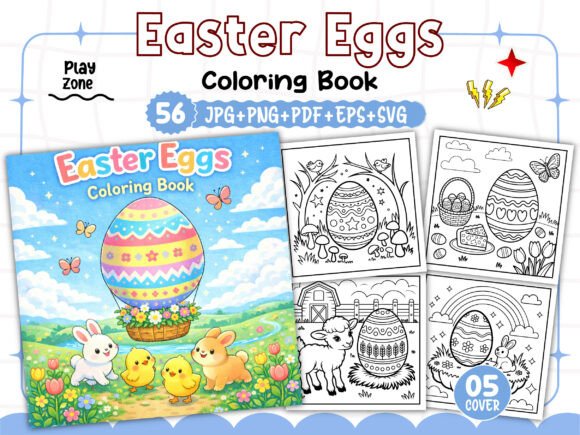
Creating a unique and marketable coloring book for Amazon KDP starts with strong, versatile assets. The Easter Eggs Coloring Pages for Kids interior set offers exactly that: a complete package of 56 black-and-white illustrations, plus cover images, in multiple file formats. Whether you are a seasoned self-publisher or just launching your high-content book business, this resource gives you a ready‑to‑use foundation that you can adapt, combine, and personalize. Let’s explore what makes this collection special, how you can use it creatively, and what practical steps ensure your final book stands out on the marketplace.
What Makes This Coloring Page Collection Unique
At its core, this product is a meticulously prepared interior for an Easter‑themed kids’ coloring book. You receive 56 individual images (JPG, PNG, SVG) at 300 DPI, a print‑ready PDF, an editable EPS file, and five bonus PNG images for the book cover. The dimensions are square: 8.5” x 8.5”, a popular trim size for children’s activity books. Every element is black‑and‑white, optimized for clear printing on standard home or commercial presses.
What truly sets it apart is the combination of high resolution and multiple formats. The SVG files allow you to scale or modify individual eggs without losing quality—perfect if you want to adjust line thickness or add your own decorative elements. The EPS file gives professional designers freedom to rearrange, recolor, or combine pages in Adobe Illustrator or similar software. For those who prefer a quick upload, the PDF is already print‑ready, saving hours of layout work.
Because the set is built for KDP, it has been tested on the platform, so you can trust that margins, bleed, and resolution meet Amazon’s requirements. This removes much of the guesswork and lets you focus on the creative side: building a book that feels fresh and engaging.
Creative Possibilities Beyond the Basic Pages
While the 56 illustrated eggs are complete on their own, they are also a springboard for many variations. Here are several approaches to make your interior distinctive.
Mix and Match with Other Themes
Easter eggs naturally pair with bunnies, chicks, baskets, and spring flowers. You could combine the egg pages from this set with a few additional illustrations (from other royalty‑free sources or your own drawings) to create a broader Easter activity book. For example, alternate between an egg‑coloring page and a simple maze or “spot the difference” game. This variety increases the perceived value and keeps young colorists engaged longer.
Adjust Line Weight for Different Age Groups
The SVG and EPS files let you easily modify the stroke thickness. For toddlers (ages 2–4), you may want thicker, bolder outlines that are easier to color within. For older children (ages 5–8), thinner lines allow for more detailed patterns inside the eggs. By creating two versions from the same base set, you can target both segments without starting from scratch.
Create a “Patterns and Designs” Focus
Instead of using each page as a single large egg to color, consider breaking the eggs into sections or adding internal patterns (stripes, dots, zigzags). You can do this by editing the SVG files in a vector program. The result is a more challenging book for kids who enjoy intricate designs—similar to an adult coloring book but scaled down for children.
Incorporate Educational Elements
Add numbers, letters, or simple words inside or next to the eggs. For instance, an egg with the letter “E” and a small picture of an elephant, or an egg numbered “1” with one dot. This turns the coloring book into a learning tool, appealing to parents and teachers who want both fun and skill development. The blank outlines make it easy to superimpose text or small icons.
Adapting the Resource for Different Audiences and Platforms
Though designed for Amazon KDP, the files can be repurposed for other formats—as long as you respect the license terms (selling only on KDP). Here are a few adaptation ideas.
E‑Book or Print‑on‑Demand Variations
Beyond a standard paperback, you could create a spiral‑bound edition for easier page removal, a large‑print version for visually impaired children, or a digital download sold on your own website (if you have the rights). The high‑resolution PNGs work perfectly for on‑screen coloring apps or tablet‑friendly PDFs.
For Classroom or Homeschool Use
Teachers and homeschoolers often seek reproducible resources. You can compile a set of 10–15 selected pages as a freebie or paid supplement for lesson plans around Easter, spring, or cultural celebrations. The clear black‑and‑white images photocopy well and are simple enough for young hands.
For Marketing and Lead Generation
Use a few sample pages as a free download on your author website or social media to build your email list. Offer “5 Easter Egg Coloring Pages” as an opt‑in incentive. Since the images are high quality, they reflect well on your brand and give potential buyers a taste of the full book.
Practical Tips for Building Your KDP Interior
To get the most out of this product while keeping your workflow efficient, consider these best practices.
- Start with the PDF for speed. If you want a quick launch, the provided PDF is already formatted. Upload it directly to KDP after adding a cover (use the bonus PNG images for customization). Check the preview carefully to ensure all pages align.
- Use the EPS or SVG for customization. Open the file in Adobe Illustrator, Inkscape, or Affinity Designer. You can rearrange the order of pages, delete duplicates, or insert new content. Maintain the 8.5″ x 8.5″ canvas and keep at least 0.25″ bleed margin.
- Maintain consistent line weight and style. If you add your own elements, match the stroke thickness (typically 2–4 pt) and keep illustrations simple and uncluttered. Inconsistent styles can make the book look disjointed.
- Add a variety of page types. Include a title page, a “This book belongs to” page, and maybe a certificate of completion at the end. This adds professionalism and encourages repeat use.
- Test print before publishing. Even though the files are high resolution, print a few pages on your home printer or a local shop to verify that the black lines are crisp and the paper weight is appropriate.
Ensuring Originality and Audience Appeal
A common concern for KDP publishers is creating a book that doesn’t look like every other Easter coloring book. Here’s how to differentiate yours using this set as a base.
- Unique cover design: Use the bonus PNG images to craft a cover that features a bright, hand‑drawn feel. Avoid stock photo clichés. Combine a few egg illustrations with a playful font and a pastel or vibrant background.
- Curated page selection: Not all 56 pages need to go into every book. Choose 30–40 that have the most varied patterns, or group them by difficulty. This creates a more curated experience.
- Add prompts or activities: On some pages, write a simple prompt: “Color this egg with only warm colors” or “Draw a bunny inside the egg.” This encourages creative thinking and makes the book interactive.
- Use a themed title: Instead of “Easter Eggs Coloring Book,” try “Eggcellent Easter: 50+ Fun Egg Designs for Kids” or “Springtime Egg Art: A Coloring Adventure.” A descriptive, catchy title helps with search and click‑through.
Balancing Creativity with Practical Structure
While you have a flexible set of files, remember that the final product should be easy for a child to use. Keep illustrations on separate pages (one side only) if possible, or use a light gray backing to prevent bleed‑through. The 8.5″ x 8.5″ square size is excellent for little hands—it’s not too large to be unwieldy, but big enough for details. Ensure each page has a clear, centered image with consistent margins.
If you decide to add text or instructions, use a readable sans‑serif font (like Arial or KG primary fonts) at 14–18 pt size. Avoid long blocks of text; kids respond better to short, encouraging phrases. Test the readability with a sample audience if you can.
Getting the Most from Your Purchase
This interior download gives you a solid start, but your own creativity and understanding of your target audience will make the book successful. Study top‑selling children’s coloring books on Amazon: note page counts, theme depth, and reviews (especially complaints about paper quality or boring designs). Use that feedback to refine your version.
Because the files come in multiple formats, you can experiment without risk. Try different layouts, add a second color (like a light background tint), or create a series of seasonal books using the same vector framework. The time you save on illustration and formatting can be invested in marketing, cover design, and building a brand.
Remember that KDP customers often buy multiple coloring books for holidays. If this Easter interior performs well, consider creating matching sets for Christmas, Halloween, or Valentine’s Day using a similar style. Consistency across your catalog builds recognition and encourages repeat purchases.
Finally, always check Amazon’s most recent content guidelines before publishing. The high‑resolution files in this set are already optimized for KDP, but double‑check that your final PDF includes all required elements (title page, copyright page, ISBN barcode area if needed). With a well‑prepared interior and a compelling cover, you are ready to launch a product that parents and educators will appreciate.
Thank you for choosing this resource. By combining a reliable foundation with your own creative touches, you can produce a unique Easter coloring book that delights children and stands out in the marketplace. Happy publishing!