2025-2026 Craft Business Planner: Organize Your Creative Venture with Editable Canva Templates
Running a craft business means juggling a dozen roles at once. You design, source materials, market your work, track finances, manage inventory, and plan for events—often all in the same afternoon. A generic planner quickly feels off because it doesn’t speak the language of handmade goods or seasonal product cycles. That’s where a 2025-2026 Craft Business Planner KDP interior becomes useful, especially when it’s built to be fully editable on Canva. Instead of forcing your workflow into a rigid structure, you get a system you can adapt as your business evolves.
What This Planner Offers Beyond a Calendar
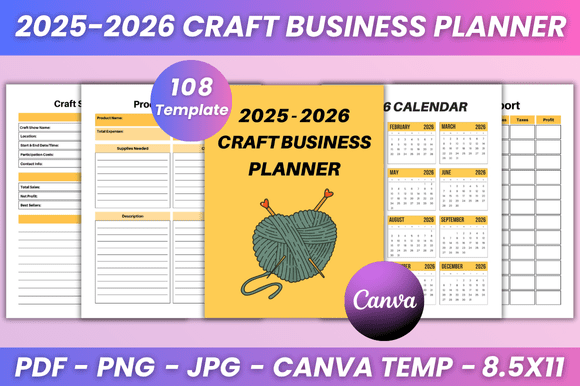
Yes, the planner includes a 2025 calendar and individual monthly pages from January through December 2025. But the real value lies in the supporting sections: password tracker, contact list, important dates, online information, daily and weekly planning pages, annual overview, to-do lists, and a work time log. For a craft business, the marketing budget, tax deduction tracker, price list, and budget spreadsheet are not just extras—they are essential for staying profitable. You also get customer follow-up lists, a customer tracker, newsletter planner, content promotion tracker, affiliate tracker, craft show tracker and craft show planner, purchase tracker, product planner, inventory log, suppliers list, and a goals tracker.
Each template is an editable Canva file. You can change fonts, sizes, colors, layout style, and even add your own photos. That means you’re not stuck with a look that clashes with your brand. Whether you sell vintage accessories or modern home decor, the visual language of your planner can match your business identity.
Where and When You’ll Actually Use This Planner
The most obvious moment is during planning season—late fall when you map out the next year. But the real application is week‑by‑week, even day‑by‑day. For example, imagine you run a small Etsy shop selling hand‑poured candles. In January, you use the annual overview to set revenue goals and decide which seasonal scents to launch. By February, you’re filling out the product planner to design your spring collection. That timer‑sensitive planning is exactly where the monthly pages guide you.
Another common scenario: you attend several craft fairs each year. The craft show tracker helps you record booth fees, travel expenses, sales numbers, and customer leads. After the show, the customer follow‑up list ensures you email those new contacts within a week. Without a dedicated space for this information, it’s too easy to let leads go cold.
Tax season is another high‑stress period for makers. The tax deduction tracker and budget spreadsheet let you record every material purchase, shipping cost, and software subscription as you go. When April arrives, your records are already organized, saving hours of digging through receipts.
Using the Planner for Content and Marketing
Many craft sellers also run social media accounts or blogs. The newsletter planner and content promotion tracker give you a place to brainstorm topics, schedule posts, and track which promotions actually drove sales. Instead of scattering your marketing notes across sticky pads and Google Docs, you centralize everything in one editable file. If you work with affiliates, the affiliate tracker keeps performance data in check, helping you decide which partnerships to continue.
How Different Users Benefit
Freelancers and solo makers appreciate that the planner replaces several separate tools. One person can manage inventory, finances, and event logistics from the same set of templates. You don’t need to buy a separate business planner, a marketing planner, and an inventory log.
Small teams or co‑founders can share a master copy on Canva and duplicate it for each member. Since everything is editable, you can create a consistent company‑wide format without forcing everyone into the same box. The password tracker is especially handy when multiple people access the same vendor accounts or social media logins.
Hobbyists turning pro often feel overwhelmed by the business side of crafting. The price list and budget spreadsheet help them set sustainable prices for the first time. The goals tracker breaks down big dreams (like “open a shop in two years”) into quarterly and monthly actions. That structure reduces the intimidation factor of running a real business.
What to Consider Before Using the Planner
Before you download, think about how you work best. The planner is provided as high‑quality print‑ready PDF files, plus JPG and PNG files. If you prefer handwriting your plans, print the pages you need and place them in a binder. If you want to go fully digital, edit the Canva templates directly, then export as needed. Because the files are editable, you can also mix formats—use a tablet for daily logs while printing monthly overviews for wall display.
Consider whether your business involves multiple years. This planner covers 2025 and includes a 2025 calendar, so if you also need 2026 planning pages beyond the calendar included, you might need to duplicate and adjust. However, many craft business cycles are yearly, and the templates are meant to be reused with fresh data each season.
Another practical point: the fully editable Canva link means you can customize the planner before printing or using it. Change the cover page to your logo, adjust the belongs to page to reflect your shop name, and swap colors to match your brand palette. This customization is not just aesthetic—it makes the planner feel like yours, which increases the likelihood you’ll actually use it.
Real‑life Features That Save Time
Let’s look at the inventory log. Without a system, crafters often overbuy supplies or run out mid‑batch. The log lets you list each material, track quantities, and note reorder thresholds. The suppliers list stores contact info and pricing for each vendor. When you need to restock, you don’t waste time searching for the right link or phone number.
The daily planner and weekly planner are straightforward but valuable. You can block time for making, packing, accounting, and marketing. Many crafters find that without separate designated slots, marketing tasks get pushed aside. The simple act of writing “email customers at 10am” improves consistency.
Why Editable Templates Matter for a Craft Business
Every craft business is unique. A soap maker’s seasonal schedule differs from a woodworker’s. A jewelry designer has different inventory needs than a fiber artist. Off‑the‑shelf planners rarely accommodate those nuances. With Edit‑in‑Canva files, you can rename sections, add or remove columns, and even merge pages from different templates. For example, you might combine the craft show planner with the purchase tracker to create a single event preparation sheet.
Additionally, because the files come as PDF, JPG, and PNG, you can upload them to note‑taking apps like GoodNotes or Notability for iPad use. The high‑quality print‑ready 8.5 x 11 inches size fits standard binders and ring planners. No need to resize or reformat.
Connecting Features to Real Outcomes
Let’s trace how specific sections lead to practical results. The customer tracker helps you remember what each person bought and their preferences. When you next run a sale on scented candles, you can target past buyers who purchased similar items. That’s not just database work—it’s relationship building that translates to repeat sales.
The tax deduction tracker prevents missed deductions. A single missed mileage deduction for a craft fair trip could cost you $50 or more. Over a year, using this tracker properly saves money that would otherwise go to taxes.
The goals tracker turns abstract ambitions into measurable milestones. For instance, if your goal is to grow your Instagram following from 500 to 2,000 by the end of 2025, you can break that into monthly follower targets and plan content themes. The content promotion tracker then logs which posts performed best, so you double down on what works.
Final Thoughts Before You Start
Whether you are a seasoned maker or just starting to take your hobby seriously, the 2025-2026 Craft Business Planner KDP provides a backbone for your operations. It’s not a magic wand, but it removes the mental clutter of keeping everything in your head or scattered across multiple apps. By spending a little time customizing the Canva templates to your brand and workflow, you set yourself up for a more organized, less stressful year. The pages you print or fill digitally become a reference you can trust when deadlines loom or tax questions arise. And because the interior is designed specifically with craft business needs—show planning, inventory, pricing, customer follow‑up—you won’t waste space on sections you never use.
If you decide to download the files, start by reviewing the full list of features. Decide which sections you need most urgently (like the budget spreadsheet if finances are tight, or the craft show planner if you have events coming up). Customize those pages first, then let the rest grow as your business demands. That way, the planner adapts to you—not the other way around.